Best Online Course Platforms for Solo Creators: 5 Tools Compared
Picking a course platform is one of the few decisions in a solo creator business that’s genuinely expensive to undo. Once you’ve uploaded your videos, built your checkout, and enrolled your first students, switching means migrating content, moving student accounts, breaking links, and re-learning a new tool — usually while trying to keep sales going. So it’s worth getting this decision roughly right the first time.
The problem is that the five most popular platforms — Kajabi, Thinkific, Teachable, Podia, and LearnWorlds — all look similar on their marketing pages. Course builder, checkout, community, “all-in-one.” The real differences hide in the pricing details: transaction fees, add-on costs, and plan limits that only bite after you’ve launched.
This comparison digs into exactly those details. All pricing, plan limits, and fees below were read off each vendor’s official pricing page on 21 August 2026; prices change, so always confirm on the vendor’s site before you commit.
What we have and haven’t tested. Five platforms is more than anyone can run properly at once, so here’s the split, plainly. We opened trials on Kajabi and Thinkific, built a course inside each, read both checkouts, and cancelled — the screenshots below and every trial figure attributed to “our checkout” come from those accounts. We later opened a LearnWorlds trial school too and tested its course builder; that hands-on work is in our LearnWorlds review. Teachable and Podia we have not run. Everything about those two is their published pricing and documentation, and we say so where it matters. We’ve checked every figure here against the vendor’s own page rather than against other comparison articles, which is how the same wrong numbers end up everywhere. Where a vendor doesn’t publish something that matters (Podia’s subscriber rates, Thinkific’s third-party gateway fees), we tell you it’s missing rather than guessing.
Some links in this article are affiliate links — see our affiliate disclosure. It doesn’t change what we recommend.
New to this? Our guide to how to sell an online course covers the four steps that come before you pick a platform.
How to actually compare course platforms
Three criteria matter far more than feature-list length for a solo creator:
1. Total cost of ownership, not sticker price. The advertised monthly price is often the smallest part of the story. Transaction fees (0% to 7.5% depending on platform and plan), payment processing fees, and usage-based add-ons (email subscribers, bandwidth) can double your real cost. A “cheap” plan with a 5% transaction fee costs more than a pricier plan at 0% once you’re selling steadily.
2. Features you’ll actually use in year one. Solo creators need a course builder, a checkout that converts, email to their audience, and maybe a community. White-label mobile apps and SCORM compliance are enterprise features — paying for them upfront is wasted money.
3. Headroom and support. What happens when you grow from 50 students to 2,000? Which limits will you hit first, and what does the next tier cost? And when checkout breaks on launch day, how fast can you reach a human?
Here’s how the five platforms stack up on paper, before we go tool by tool.
Quick comparison
| Entry plan (monthly / annual-equiv.) | Free trial | Transaction fee (entry → top) | The limit that bites first | |
|---|---|---|---|---|
| Kajabi | Basic $179 / $143 | 14 days at our checkout (30 advertised) — card required | 0% with Kajabi Payments; 2% on Basic with a third-party processor (5% on Starter → 0.5% on Pro) | Contacts (2,500 on Basic) |
| Thinkific | Basic $54 / $40 | 30 days — trials the $109 Start plan, card required | 2.9% via Thinkific Payments | Video bandwidth (100 GB/mo on Basic) |
| Teachable | Starter $39 / $29 | 7 days | 7.5% → 0% | Active students (100 on Starter)* |
| Podia | Mover $42 (annual billing costs the same) | 30 days, no credit card | 5% → 0% | Email subscribers (100 included on Mover) |
| LearnWorlds | Starter $29 / $24 | 30 days | $5 per paid enrollment → 0% | No free courses on Starter; 1,000 monthly active learners |
* Teachable removes student limits once you pass $10k/year in sales on the platform.
None of the five currently offers a permanently free plan — every one is trial-only. That surprised us too, since several used to have free tiers. Plan for a paid subscription from month one.
Kajabi: the all-in-one for creators who sell with funnels
Kajabi is the most expensive option here, and it’s not subtle about why: it wants to replace your email tool, landing page builder, funnel software, and course platform in one subscription. Landing pages, funnels, email sends, and automations are unlimited on every plan.
The pricing structure rewards using Kajabi’s own payment processing. With Kajabi Payments you pay standard card processing (2.9% + 30¢, improving slightly on higher tiers) and no platform fee. Route payments through a third-party processor instead and Kajabi adds a platform fee on top of whatever your processor charges: 5% on Starter, 2% on Basic, 1% on Growth, 0.5% on Pro. If you’re considering Kajabi, plan to use its native payments.
The limits to watch are products and contacts: Basic gives you 5 products and 2,500 contacts, Growth raises that to 50 products and 25,000 contacts and adds a branded mobile app (which Kajabi’s pricing page values at $199/mo). Kajabi’s own branding, though, only comes off on Pro. Contacts are included in the subscription rather than sold as an add-on, which matters if you’re comparing against Podia (more on that below).
Strengths: genuinely complete marketing stack (funnels, email, CRM, automations) so you may not need any other subscriptions; unlimited email sends and landing pages on all plans; contact allowances built into the price.
Weaknesses: the highest entry price of the five; overkill if you just want to host a course and already have an email tool; removing Kajabi’s own branding costs $499/mo, the most expensive white-labelling in this comparison.
Kajabi runs promotional discounts fairly often, so check the current pricing — but budget on the standard rates, not the promo.
What signing up is actually like
We ran a Kajabi trial while building this comparison, and two things came out of it that the pricing page won’t tell you.
The checkout gave us 14 days, not 30 — card required, billed automatically afterwards — despite 30-day messaging elsewhere on the site. Whatever the marketing says, diary the cancellation date from the screen you actually see.
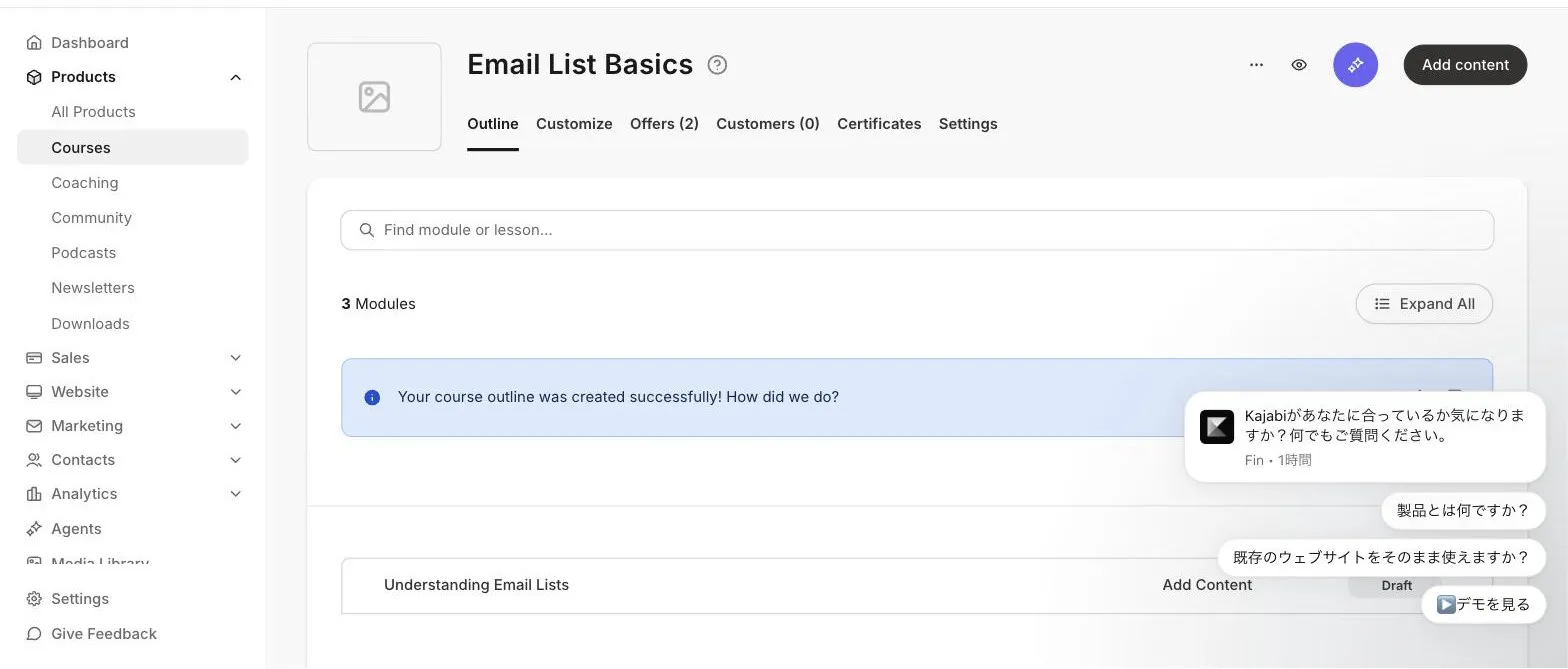
Course setup, on the other hand, is quick. Kajabi asks whether the course is evergreen or cohort-based, then builds a module outline out of a title and a single sentence:
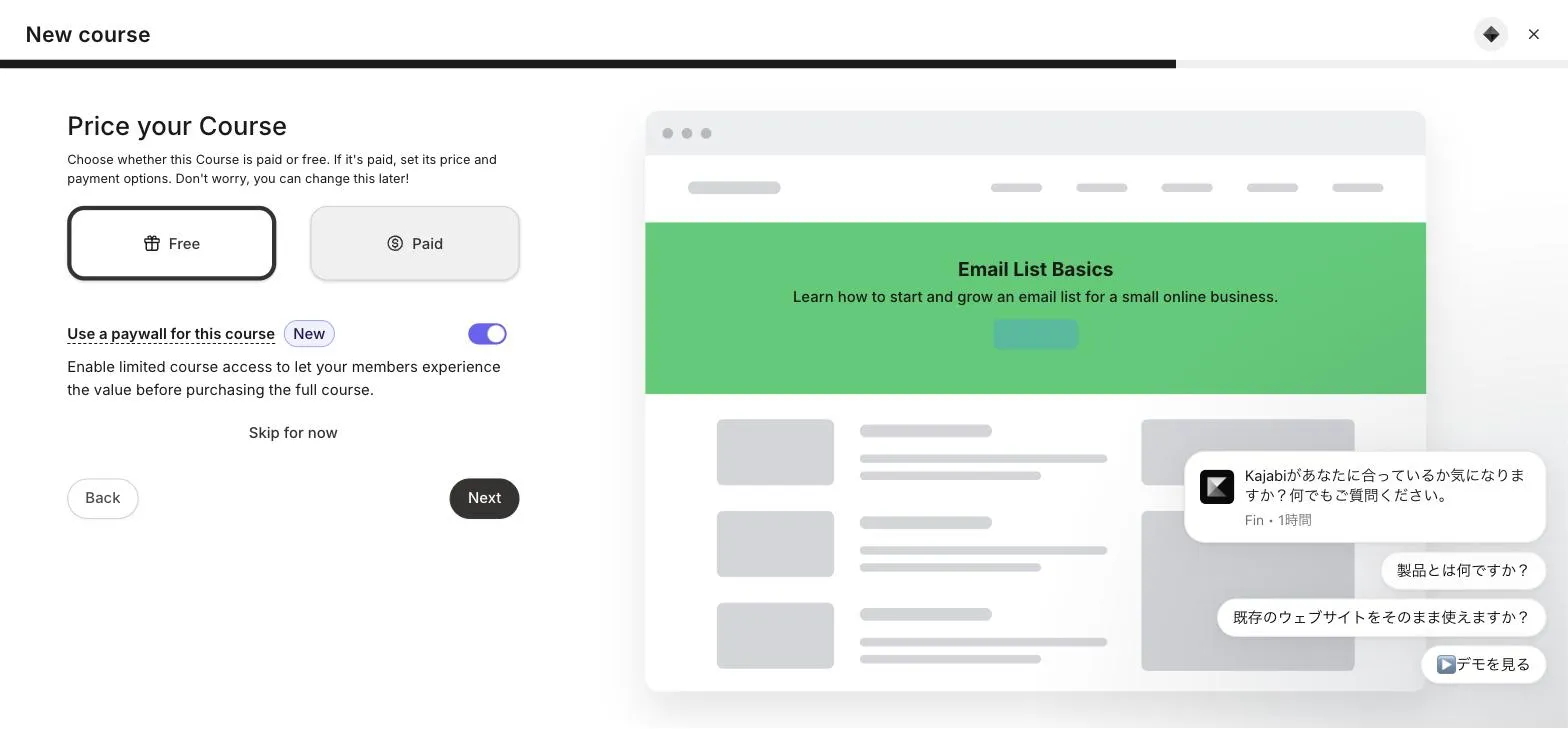
Pricing sits inside that same flow rather than waiting until later — free or paid, with an optional paywall that gives prospects limited access before they buy. For a platform built around selling, that placement is the point:
Thinkific: the balanced default with generous limits
Thinkific’s Basic plan ($54/mo, or $40/mo billed annually) is where a lot of solo creators land, and the limits explain why: unlimited published courses and 10,000 students on every plan, including the cheapest. The scarce resource is video bandwidth instead — 100 GB/month on Basic, 200 GB on Start, 400 GB on Grow. For most text-and-video courses that’s plenty; if you’re streaming hours of HD video to hundreds of students, model it before choosing a tier.
Payments run through Thinkific Payments at a flat 2.9%, with no separate platform fee. You can use Stripe or PayPal directly instead, but then a third-party gateway fee applies that varies by plan — Thinkific doesn’t publish a simple rate table for it, so confirm with their support before choosing that route.
The step from Basic to Start ($109/mo) unlocks the commerce features that matter once you’re selling seriously: memberships, bundles, private courses, completion certificates, and Zoom integration. Grow ($219/mo) removes Thinkific branding. Thinkific also lists a branded mobile app at $199/mo, but shows it as included with select enterprise plans rather than as an add-on you can attach to Basic, Start, or Grow — ask before you count on it.
Strengths: unlimited courses and a 10,000-student allowance from the cheapest plan; clean, well-regarded course builder; flat, predictable payment fees via Thinkific Payments.
Weaknesses: the features solo creators eventually want (memberships, certificates, bundles) sit on the $109/mo tier, not the $54 one; third-party payment fees are opaque; bandwidth caps are unusual among these five.
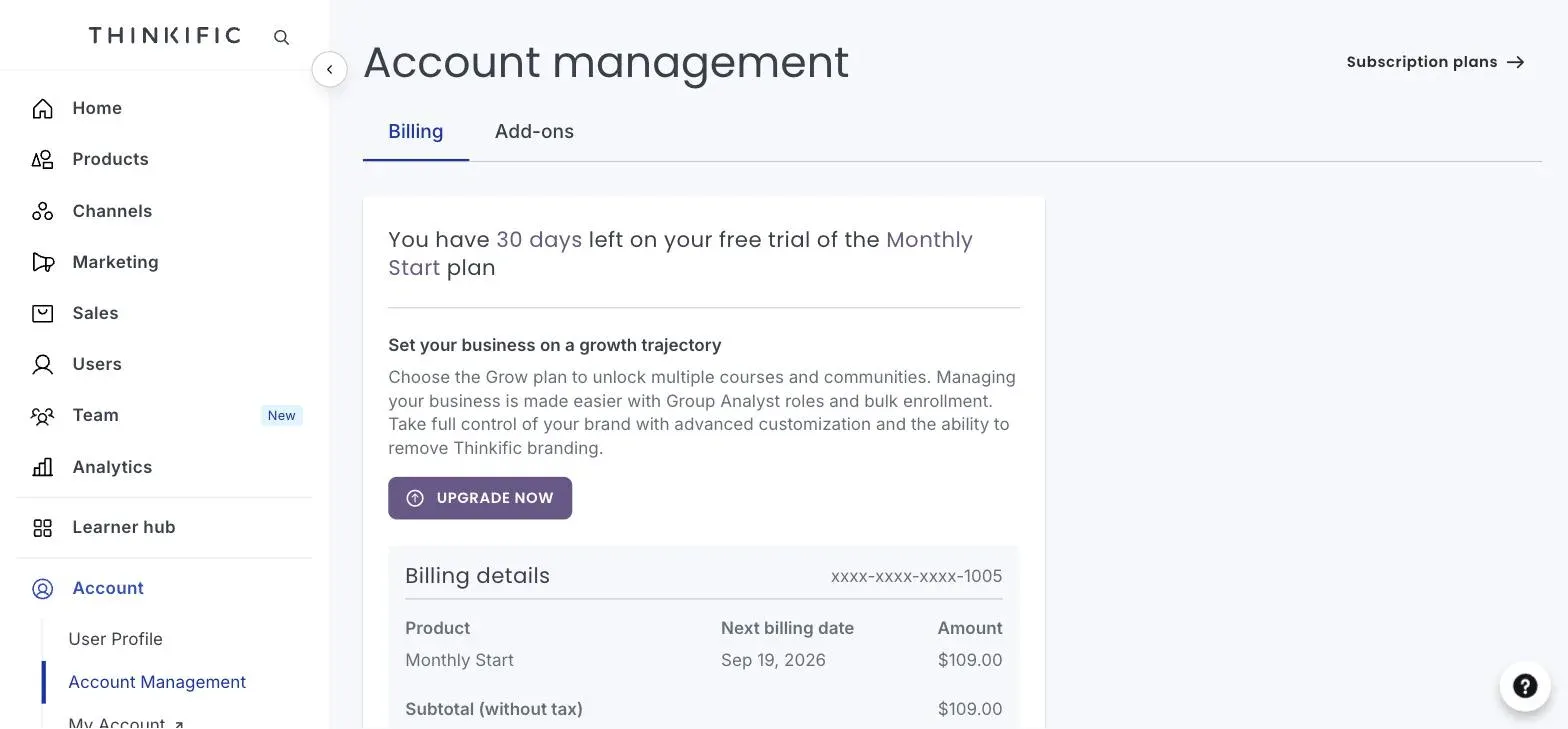
You can explore everything on a 30-day free trial — with two details we confirmed by signing up. The trial runs on the Start plan ($109/mo), not Basic, with a card on file that’s charged $109 if you don’t cancel; and cancelling first offers 30 extra free days, then downgrades your account (content kept, premium features dropped) rather than deleting it. Generous in practice — just budget against the right plan and set a reminder. Here’s the billing screen we saw, thirty days out and pointed at $109:
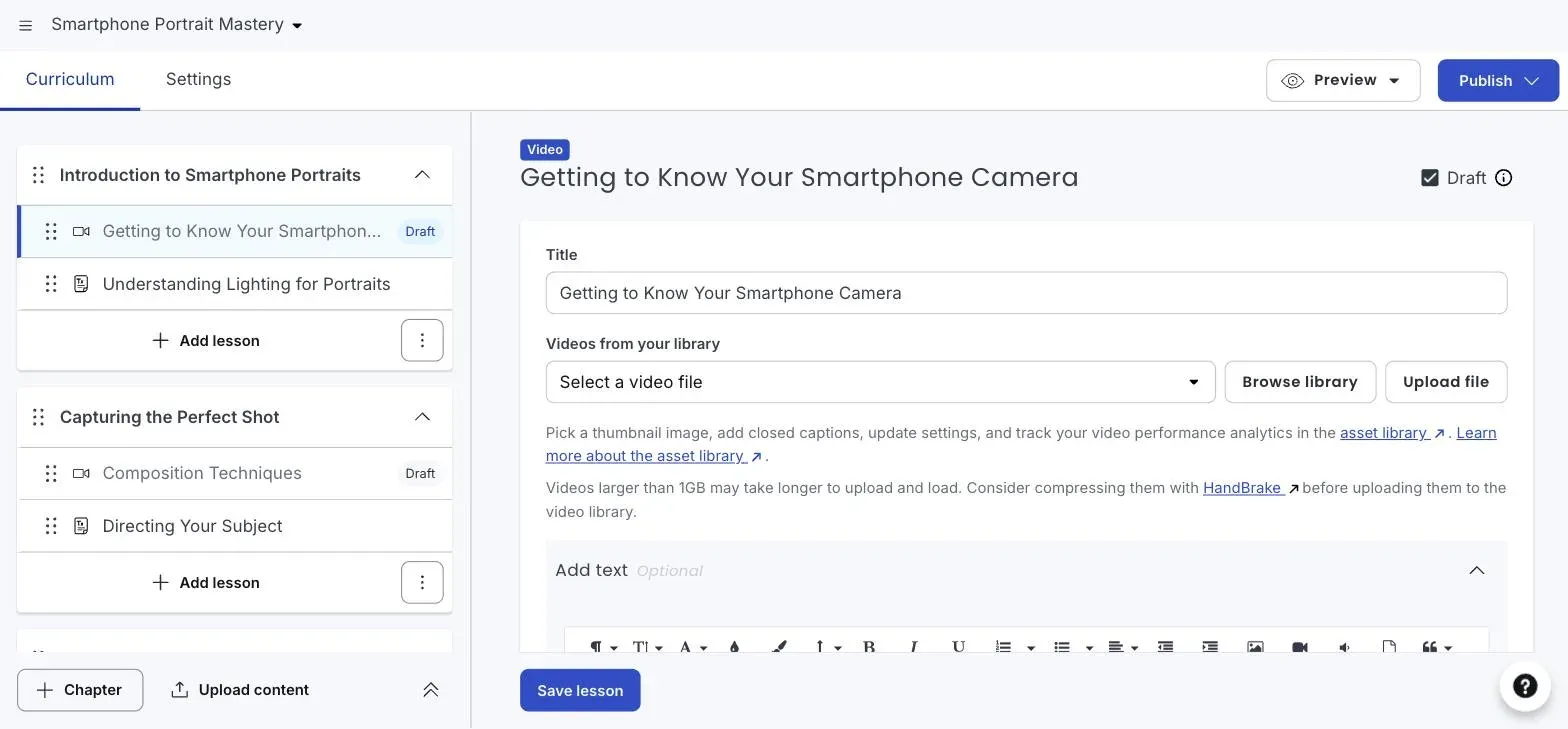
Its AI setup also goes a step further than Kajabi’s. From one sentence it produced chapters, the lessons inside each of them, and a content type per lesson — video here, text there — then opened the first one in the editor with the upload field waiting:
Neither platform writes the course for you. Thinkific just leaves you fewer decisions to make before you can start filling one in.
Teachable: the cheapest way in — read the fee table first
Teachable’s Starter plan is the lowest headline price of the big three US platforms ($39/mo, $29 annual-equivalent), and its student mobile app is included on every plan. But two numbers deserve your attention before you sign up.
First, the 7.5% transaction fee on Starter. Combined with payment processing (2.9% + 30¢ for US cards), you’re giving up roughly 10% of each sale on the entry plan. The fee drops to 0% on Builder ($89/mo) and above, which changes the math quickly: if you’re selling more than a few hundred dollars a month, Builder can cost less in total than Starter.
Second, the 7-day trial. Most platforms in this comparison give you 30 days — though Kajabi’s checkout showed us 14 despite its 30-day messaging — and Teachable gives you one week (plus a 30-day money-back guarantee). Plan your evaluation time accordingly.
The plan limits look tight on paper — 100 active students on Starter, 1,000 on Builder, 5,000 on Growth — but there’s an important exception: once you pass $10,000/year in sales on the platform, Teachable removes the student limits. Comparisons that just quote the caps miss this.
Teachable’s standout operational feature is handling global payment complexity for you: US sales tax, VAT, and GST are calculated and handled on the platform’s side, which is genuinely valuable if you sell internationally and don’t want to think about tax filings in jurisdictions you’ve never visited.
Strengths: lowest entry price; student iOS/Android app on all plans; sales tax/VAT handled for you; student limits lift at $10k/year in sales.
Weaknesses: 7.5% transaction fee makes Starter a false economy beyond hobby volume; 7-day trial is short for a serious evaluation; only 1 admin seat until the $189/mo Growth plan.
If you want to test it, the free trial is short — block out the week.
Podia: the simplest — but price the email add-on honestly
Podia’s pitch is simplicity: every plan includes courses, digital downloads, coaching, community, a website builder, blog, and landing pages. For a creator who wants one tool and no integrations diagram, that’s appealing. It’s also the only platform of the five that explicitly requires no credit card to start its 30-day trial, which makes it the easiest to genuinely test.
Two pricing details matter. First, Podia’s rates are unusually flat: $42, $84, and $150 a month for Mover, Shaker, and Earthquaker, and the annual option ($504, $1,008, $1,800 a year) works out to exactly the same monthly rate. Every other platform here dangles a 20-ish percent annual discount; Podia doesn’t — which also means there’s no reason to lock yourself into a year.
Second — and more importantly — email subscribers are an add-on, and the included allowances are tiny: 100 subscribers on Mover, 500 on Shaker, 1,000 on Earthquaker. Podia’s pricing page says you can add more at any time but doesn’t publish the rate. So the one number that decides whether Podia is cheap for you is the number it won’t show you. Ask Podia for the subscriber pricing in writing before committing, and compare the total against Thinkific Start or Teachable Builder plus a standalone email tool — GetResponse, for reference, is $54/mo at 5,000 contacts. If your list is your main asset, this is simultaneously the most important detail and the hardest one to check.
Also note: the Mover plan carries a 5% transaction fee (0% on Shaker and up) and doesn’t include PayPal — that’s a Shaker-and-above feature.
Strengths: everything included on every plan (site, blog, downloads, coaching, community); easiest platform to test (30 days, no card); flat pricing with unlimited customers.
Weaknesses: unpublished email subscriber pricing makes the real cost hard to model before you sign up; 5% fee and no PayPal on the entry plan; fewer advanced marketing features than Kajabi.
You can start a free trial without entering a card.
LearnWorlds: the learning-experience specialist with a tricky entry fee
LearnWorlds differentiates on the learning experience itself: interactive videos with in-video questions, AI-generated subtitles and translations, built-in assessments, and a social community. If your courses are more than “video playlist plus PDF,” it’s the most pedagogically capable tool here — and video hosting is unlimited on all plans.
The entry pricing needs care, though. Starter is the cheapest headline price in this comparison ($29/mo, $24 annual-equivalent), but it charges a flat $5 fee per paid enrollment. That’s not a percentage — it’s $5 whether your course sells for $20 or $500. On a $20 course that’s an effective 25% fee; on a $300 course it’s under 2%. Cheap courses and Starter don’t mix. Pro Trainer ($99/mo) removes the fee entirely.
Starter has one more constraint that’s easy to miss: you can’t create free courses on it. If your funnel strategy involves a free mini-course as a lead magnet — a common solo-creator play — you need Pro Trainer.
Prices are listed excluding VAT — LearnWorlds adds it for EU customers unless you supply a valid EU VAT number — so European creators should budget the gross figure. Starter also caps you at 1,000 active learners a month, though the number of paid courses is unlimited. Payments run through your own Stripe or PayPal account on all plans.
Strengths: best-in-class course experience (interactive video, assessments); unlimited video hosting on every plan; strong AI tooling for subtitles, translations, and course building.
Weaknesses: $5-per-enrollment fee makes Starter unsuitable for low-priced courses; no free courses until the $99/mo tier; the full white-label experience sits on the $299/mo Learning Center plan.
The 30-day trial covers the core features (current plans: LearnWorlds pricing).
Which platform fits which creator
You want marketing and courses in one subscription → Kajabi. If Kajabi replaces a $30 email tool, a $40 funnel builder, and a $50 course platform, its price stops looking extreme. Buy it for the whole stack or not at all.
You want the safest all-round choice → Thinkific. Generous limits from the cheapest plan, predictable fees, and a clear upgrade path. The default pick if none of the special cases below apply to you.
You’re starting on the smallest budget and selling internationally → Teachable, on the Builder plan if you expect real sales volume — the Starter fee math punishes success. The built-in tax handling is the sleeper feature.
You want one simple tool and a genuine trial → Podia. Best for creators with small email lists selling a mix of courses, downloads, and coaching. Re-check the math when your list grows past a few thousand subscribers.
Your course experience is the product → LearnWorlds. Interactive video and assessments matter for premium, high-priced courses — which are exactly the courses where its enrollment fee is negligible.
Frequently asked questions
Is there a free course platform among these? Not anymore — all five are trial-only. If you need $0 to start, you’d be looking at marketplaces (with steep revenue shares) or self-hosting, both of which trade money for significant other costs.
Which has the best trial? Podia for lowest risk: 30 days with no credit card required. Thinkific’s is the longest in practice — 30 days plus a 30-day extension offered when you cancel — but it runs on the $109 Start plan with a card on file. Teachable’s is the most restrictive at 7 days, and Kajabi’s checkout gave us 14.
Can I switch platforms later? Yes, and Podia even offers migration help on paid plans — but moving students, content, and URLs is disruptive. It’s cheaper to spend a week deciding now than a month migrating later.
Bottom line
For most solo creators, the practical shortlist is Thinkific for balance, Podia for simplicity, or Kajabi if you’ll use the whole marketing stack. Teachable earns its place on price if you start on Builder, and LearnWorlds when the learning experience is your differentiator.
Every one of them lets you start free — so pick the one or two that fit your situation, take the trials, and build one real lesson in each before you commit. A tool you’ve actually touched beats any comparison table, including this one.